Hello!
Yes, I do admit it’s been a while, but rest assured, the drone hasn’t stopped. In fact, it's been an intense period of familiarizing myself more with Linux, GUI environments, root access, Tkinter, and the COCO dataset. Pivoting our focus to front-end development using Tkinter and GUI has already had its fair share of challenges. From scouring the web for tutorials on Tkinter to understanding and troubleshooting errors, and ultimately making it visually appealing to a pilot’s eye, the program has been both educational and demanding.
What is Tkinter and GUI ?

Tkinter is the standard Python interface to the Tk GUI (Graphical User Interface) toolkit. It provides a powerful and flexible framework for developing GUI applications in Python. With Tkinter, you can create windows, dialog, buttons, menus, and many other standard GUI elements, all with Python's simplicity and power.
GUI (Graphical User Interface) refers to the visual elements of a software application that users interact with. Instead of typing commands, users can click buttons, select options from menus, and interact with graphics to control software functionalities.
Why Tkinter and GUI for the DroneRanger?

-- Enhanced User Interaction: By implementing a GUI, we make DroneRANGER more accessible and user-friendly. Pilots can control and monitor the drone through intuitive graphical controls instead of relying on command-line inputs. This reduces the learning curve and increases operational efficiency.
-- Real-Time Data Visualization: With Tkinter, we can display real-time data such as flight statistics, battery levels, and video feeds in a cohesive dashboard. This visual representation enables pilots to make quick, informed decisions, enhancing the overall safety and performance of drone operations.
-- Error Handling and Debugging: A well-designed GUI can also aid in error handling. Instead of cryptic command-line error messages, the GUI can present clear, user-friendly notifications and suggestions for troubleshooting. This is crucial in reducing downtime and maintaining smooth operations.
-- Customization and Flexibility: Tkinter allows us to tailor the interface to specific needs. Whether it’s customizing controls for different flight modes or integrating new features as the project evolves, the flexibility of Tkinter ensures that DroneRANGER can adapt to any requirement.


Accessing Docker

Open Terminal:
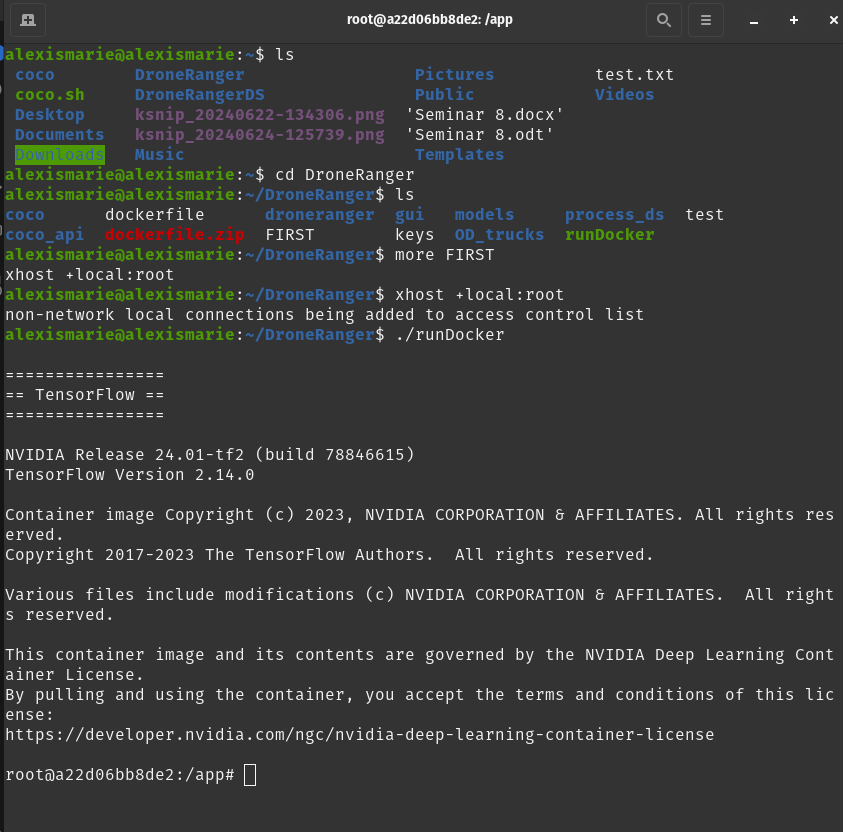
1. First, open your terminal.

2. List Directory Contents: “ls” to list the contents of your current directory + enter

3. Identify the folder you need to access and use the “cd Your Folder's Name” + enter

4. List Directory Contents: “ls” to list the contents of your current directory + enter

5. Access Docker: You should have a Docker command or phrase ready in the folder. I recommend keeping this command handy for easy access. Typically, I copy and paste the Docker command ( + enter )related to the specific file or environment I need to access.

6. Run Docker: Once you have pasted the Docker command, execute it to gain access to your Docker environment.
Launch VS CODE
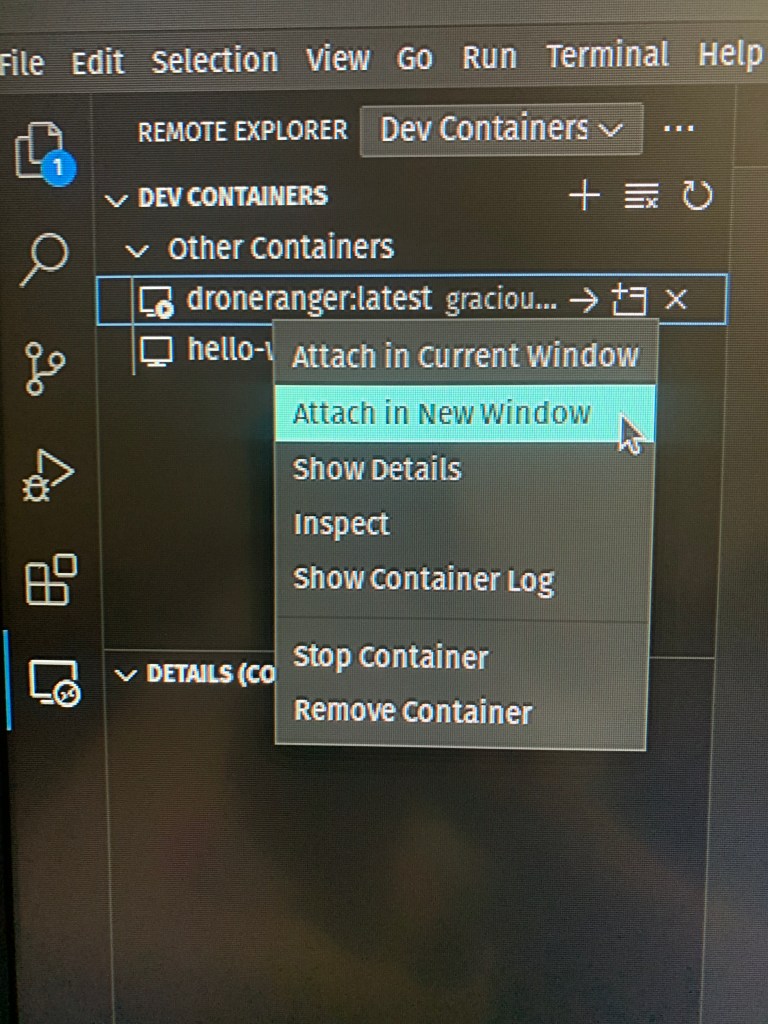
-- Open VS Code: Launch VS Code and connect it to your Docker environment. Click on the bottom whale icon (or a computer screen icon for remote explorer) in VS Code.

-- Attach to Container: Right-click on the latest container and select "Attach in new window." This will open a new VS Code window connected to your Docker container, allowing you to code without compromising the integrity of your environment.
Each setup may vary slightly, and there are numerous ways to streamline this process. However, by following these steps, I established a robust and isolated environment for my project, ensuring that my work within Docker remains consistent and secure. Now that I have my environment set up and connected to VS Code, I can seamlessly proceed with coding, training my models, and focusing on front-end development. This brings me to the next phase of my DroneRANGER program—this might be the most exciting part yet! Subscribe and stay tuned for tips on how to make your drone survey like a pro.

 Aiming for the Stars: My Aspirations in Aerospace and AI
Leave a comment