Welcome back to another exciting update on my capstone project, The DroneRanger! This week, we’re diving into the development of a sophisticated GUI designed to enhance the user experience for drone pilots. The core of this week’s work focuses on creating a customizable interface where pilots can tailor their profiles to suit their professional needs. This is a critical step in ensuring that the system is not only functional but also user-friendly and intuitive.
Strengths of the Current GUI:
- Clean Layout: The use of
LabelFrameand grid layout keeps the interface organized and easy to navigate, which is essential for a professional tool.
- Scalability: The modular design allows for easy expansion as more features and fields are added, ensuring the interface can grow with user needs.
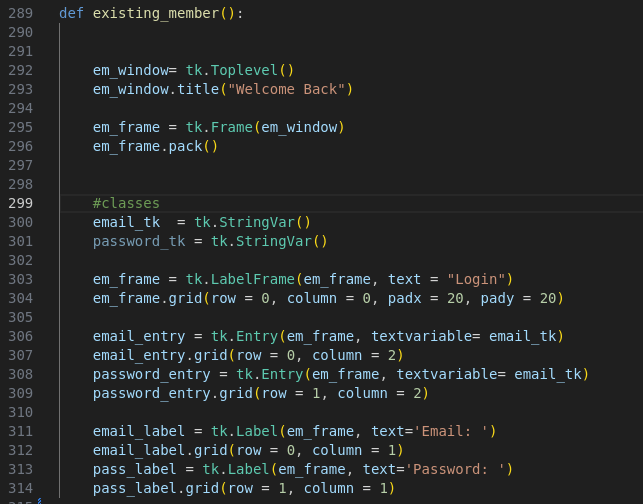
Fig. 1 : "Label frame" code
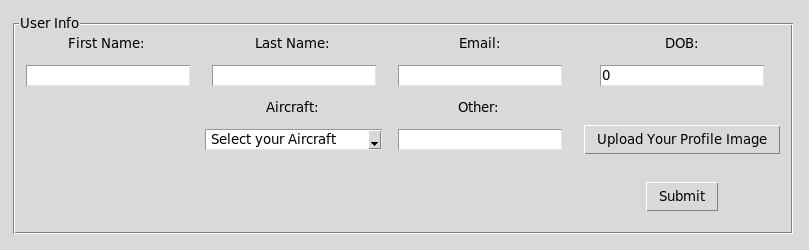
Fig. 2: "Label frame"nicely separating the window from from the frame to its own perimeters to display information more appealing to the pilot.
Areas for Improvement:
- Dynamic
ComboboxValues: To enhance user experience, populating theComboboxwith available aircraft options could be automated. This could involve fetching data from a database or a predefined list. - Input Validation: Adding validation for entries (e.g., ensuring the email follows the correct format or DOB is a valid date) would prevent errors and improve data integrity.
- Custom Styles: Implementing custom themes and styles using
ttk.Stylewould give the GUI a more polished, professional look, making it more appealing to users.
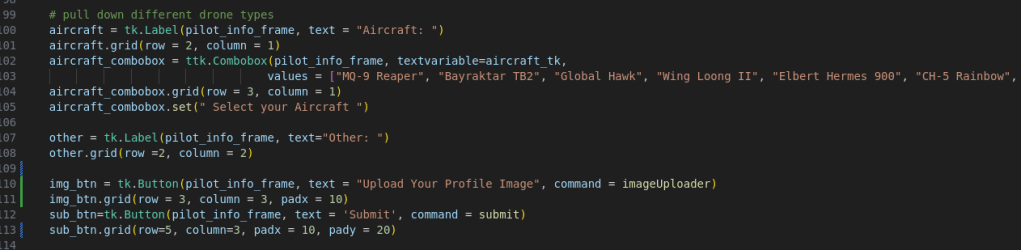
Fig. 3: Different menu options, such as "combobox."
In upcoming weeks, I’ll focus on integrating these improvements and continuing to refine the interface to meet the high standards expected by drone pilots. Stay tuned for more updates!
Sincerely, Yours Truly
 Aiming for the Stars: My Aspirations in Aerospace and AI
Leave a comment